Chicago O'Hare ORD
- 4.4
- Rating
- 10.00K
- Installs
- Free
- Price

 Analysis by App-foxy
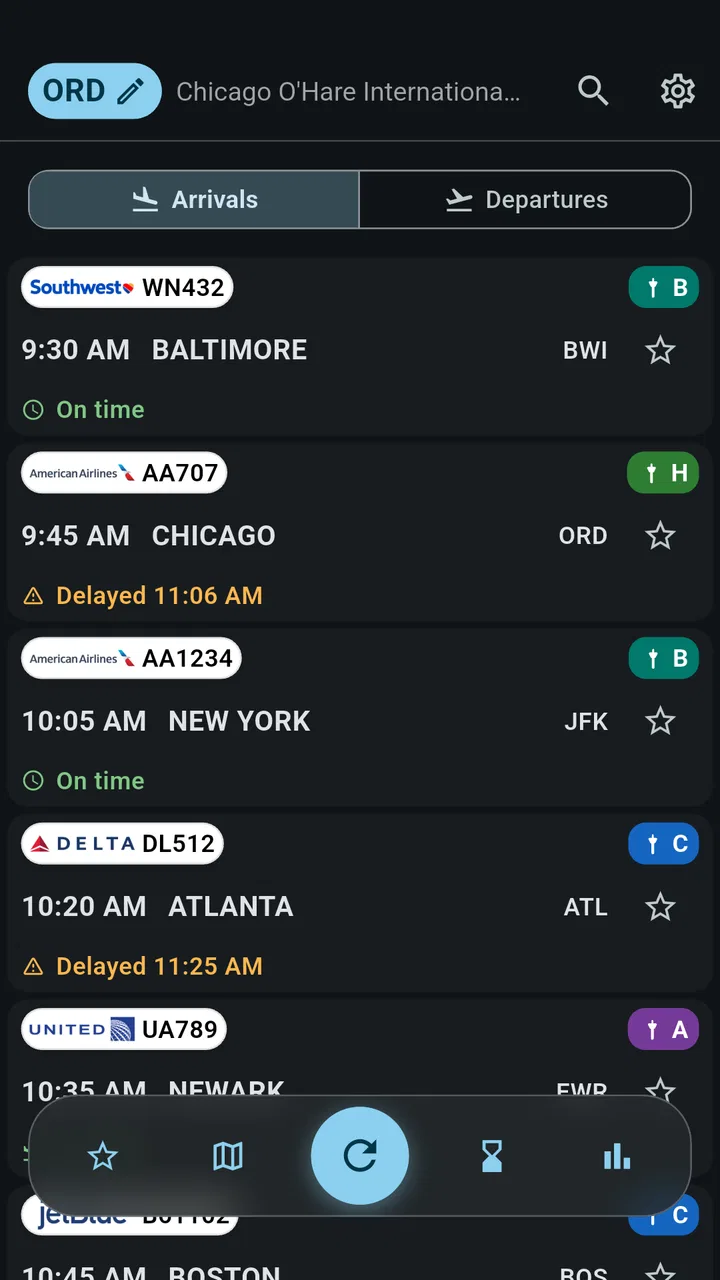
When I am heading through Chicago O’Hare, the hardest part is often not finding the airport itself but keeping track of what is changing around my flight. A gate can move, a departure can slip, and an arrival can affect the person waiting for me. Chicago O'Hare ORD is built for that narrow, practical problem: it is a Travel & Local app focused on live airport information for ORD.
I approached it as a companion for a real airport day rather than as a complete trip planner. That distinction matters. This is not the sort of app I would open to compare hotels, build an itinerary, or discover restaurants across Chicago. Its value is much more concentrated: it puts flight movement, gates, arrivals, departures, and delays in one place so I can check the airport situation without digging through several unrelated screens.
The app is free to install, although optional in-app purchases range from $3.49 to $32.99 per item. It is rated for mature users aged 17 and older, and FlightInfoApps.com is the developer behind it. With an average of 4.4 from around 129 ratings and over 10K installs, it has a modest but meaningful user base rather than the visibility of a major airline platform.
You May Also Like

 Blood Strike: 2.5 Anniversary
Blood Strike’s Loadouts Turn Every Drop Into a Tactical Gamble
A close look at Blood Strike’s custom loadouts: how fast access to signature weapons reshapes its battle royale rhythm, rewards preparation, and narrows the gap between fights.

 Pandora - Music & Podcasts
Pandora’s Music Is Easy to Start, but Harder to Recover
Pandora’s strength is its low-effort path from a seed to a station. Its weak spot is how much confidence it asks you to place in connection, setup, and quiet recovery.

 8 Ball Pool
8 Ball Pool Is Built on Rivalries, Rematches, and Routine
A close look at the rivalries, rematches, shared routines, and unanswered safety questions that turn a quick pool match into a persistent mobile community.

 Samsung Music
Samsung Music’s Quiet Strength Is Playing What You Already Own
Its reach comes less from spectacle than from dependable access to a personal library. That simplicity is both the app’s strongest retention engine and its ceiling.

 AccuWeather: Weather Radar
AccuWeather Review: A Quick, Clear Forecast for Everyday Decisions
For everyday plans, the best forecast is the one you can understand quickly. AccuWeather makes rain timing, radar, and local conditions easy to act on, with a few trade-offs.

 Hill Climb Racing
Why Hill Climb Racing Still Turns Crashes Into One More Run
A tiny car, a bumpy hill and one more upgrade: Hill Climb Racing keeps resurfacing because its simple chaos makes every near-miss feel personal.
More From Our News Desk
View All News


What I trusted, and what I checked carefully
I trust a focused ORD check most when I use it to guide a decision, not to make one for me. In this section, I look at the small habits that help me judge a changing flight update calmly, including when I would pause and verify the details through another channel. That distinction leads naturally to the next question: how to make repeat checks quicker without assuming the app does more than it shows.
A focused airport tool instead of a broad travel platform
The strongest trust signal for me is the app’s limited purpose. Chicago O'Hare ORD does not present itself as a universal travel service; it stays centered on one airport. That focus makes the information easier to interpret. When I open it, I am looking for the status of a flight or the latest airport detail, not trying to work out which of several travel tools I should use.
That narrow design is especially useful when I am already under pressure. Imagine leaving work to collect someone from O’Hare. Before driving, I can check whether the flight is still arriving as expected. If the status has changed, I have a reason to delay the trip instead of circling the airport or waiting at the curb. The same workflow works for a passenger checking a departure before leaving home.
I would still treat the app as an information aid, not the only authority for an important journey. Flight details can change quickly, and an airline’s own communication remains important when a cancellation, rebooking, or baggage issue affects the whole trip. The sensible habit is to use this app for a quick airport view, then confirm major decisions through the airline or official airport channels.
Why the developer and app history matter
FlightInfoApps.com has maintained this app since its release on December 8, 2012. I see that long availability as useful context, but not as proof that every screen will suit every modern phone or traveler. The current version is 26.8.23, and the app supports Android starting with version 7.0. That broad compatibility can help people using older Android devices, although an older operating system may also mean a less comfortable experience than on a recent phone.
The public rating gives me some confidence that many users find the app useful, but I would not read a 4.4 average as a guarantee of perfect accuracy or polish. Around 20 written reviews are a much smaller body of detail than the rating alone suggests. I would therefore judge it by the job it needs to do: quick ORD monitoring, not a replacement for every official travel service.
There is also a practical trust lesson here. A specialized airport app can be easier to understand than a large travel platform, but it may not provide the same account ecosystem, airline support, or booking protections. I like the focused approach for checking information. I would not use it as the place to resolve a ticket dispute or manage a complicated itinerary.
Visible choices are more important than assumptions
When I review a travel app, I pay attention to what the user can see and control rather than assuming that a familiar feature exists behind the scenes. Chicago O'Hare ORD is presented as a live information tool, so I would inspect its visible settings, notification choices, and any purchase screens before relying on it throughout a trip.
This is also where I stay cautious about data practices. I do not treat a simple interface as evidence that an app collects little information, and I do not assume that a free download has no commercial controls. The presence of optional purchases means I would read each purchase prompt carefully, check what it unlocks, and make sure I understand whether a payment is one-time or recurring before confirming it.
That habit is particularly important when someone is tired, rushing through an airport, or handing a phone to a family member. I prefer to make decisions about purchases and notifications while I have time to read the wording. If the app asks for a permission that does not make sense for the task I am performing, I would pause rather than approve it automatically.
How I would use it during an actual airport day
My preferred workflow starts before leaving for O’Hare. I would open the app, locate the relevant arrival or departure, and note the current gate and status. I would then check again before entering the car or train. This two-step habit is more useful than leaving the app open continuously, because it gives me a fresh decision point without turning the phone into a permanent monitoring screen.
For a pickup, I would use the arrival information to decide when to leave, then check the gate and any delay while traveling. I would not promise to meet someone at a precise curb location based only on an earlier glance. O’Hare is large, and the passenger may still need time for baggage, walking, or ground transportation. The app can reduce guesswork about the flight, but it cannot remove the practical uncertainty after landing.
For a departure, I would check the flight before leaving home and again after reaching the airport. A gate shown in an app is useful for orientation, but I would still look at airport displays because gates can change and airport staff may provide the most immediate instruction. This is one of the app’s important trade-offs: it can make a quick check easier, but it should support, not replace, the airport’s own signs and announcements.
A less obvious use is helping a nontraveler coordinate with someone arriving. If I am collecting a relative, I can monitor the flight without asking them to message while they are dealing with boarding or landing. That reduces interruptions and gives me a better idea of when to start driving. It is a small workflow, but it is exactly the kind of practical benefit that a broad travel app can bury under bookings and recommendations.
Where user control deserves attention
I would set up the app with the minimum access and communication choices needed for my purpose. If I only want to look up a flight manually, I would not enable every alert or background option by default. If I do choose notifications, I would review them after the trip and turn off anything I no longer need. This keeps a single airport tool from becoming unnecessary noise.
That approach also makes it easier to notice what the app is actually doing. A user who enables every prompt at once may not know which setting produced an alert or why a particular screen appeared. I prefer changing one choice at a time, then checking whether it improves the workflow. This is not a criticism of the app alone; it is a sensible way to stay in control of any travel utility used during a busy day.
Purchases deserve the same care. The app costs nothing to download, but the available items can reach $32.99. I would never tap a purchase merely to remove uncertainty about a delayed flight. First I would determine what the item provides, whether it is necessary for my use, and whether the free experience already covers the status checks I need. For occasional O’Hare travelers, paying may not be worthwhile if the basic information is enough.
I also like keeping the airline’s app or website available separately. That gives me an independent route for boarding information, check-in, rebooking, and airline messages. Using two sources is slightly less convenient than relying on one, but it is more resilient when the information I need is important or time-sensitive.
Situations where I would skip it
I would skip Chicago O'Hare ORD if my travel needs extend beyond O’Hare. Someone flying through several airports will probably prefer a broader flight-tracking service or an airline app that follows the entire itinerary. Likewise, a traveler looking for reservations, maps across Chicago, attraction planning, or local recommendations will need other tools.
I would also hesitate to make it my primary choice if I need a rich account system. The app’s appeal is its airport-specific focus, not a full profile for managing tickets and travel documents. If I am dealing with a complicated connection, a disrupted booking, or a special assistance request, I would go directly to the airline and airport resources instead.
Another limitation is the risk of overconfidence. A clean status screen can feel definitive, but airport operations are fluid. A displayed gate is not a substitute for checking the terminal signs, and a listed arrival does not tell me how long baggage or passenger pickup will take. The app is most useful when I treat its information as a current snapshot and keep enough flexibility for the real airport experience.
How it compares with familiar alternatives
Compared with an airline app, this tool may be more convenient when I want an airport-level view rather than information tied to one carrier. An airline app is usually the better place for check-in, boarding passes, rebooking, and direct messages about my reservation. Chicago O'Hare ORD makes more sense when I am watching an arrival for someone else or checking several airport movements without managing a ticket.
Compared with the official airport website, the app can be quicker for a glance on a phone. The website may be the better reference for broader airport guidance, terminal services, and official instructions. I would use the two differently: the app for fast status checking, and official airport information when I need operational context.
Compared with a general flight tracker, the advantage here is concentration on ORD. A general tracker may be preferable for a multi-airport itinerary or a person who follows flights regularly across different cities. The focused option is easier to justify when Chicago O’Hare is the only airport that matters for the day.
Compared with simply searching the web, a dedicated app can save a few steps when I repeatedly need the same airport. The trade-off is that installing another app creates another place to review settings, permissions, and purchase prompts. For a one-time trip, a browser or airline channel may be enough. For recurring pickups or regular ORD travel, the focused app becomes more practical.
What I would check before depending on it
Before a major journey, I would install it while I still have reliable internet, open the flight view, and make sure I can find the information I need without rushing. I would also confirm that the displayed airport and flight match my plans. This simple test prevents a last-minute discovery that I am looking at the wrong route or expecting a feature I do not actually need.
I would check the app’s visible controls before enabling alerts. I would look for notification categories, review any account or purchase prompts, and avoid sharing more information than the task requires. Since trust depends on understandable choices, I would rather spend a minute examining those screens than accept every default while standing in a terminal.
For an older Android phone, the minimum operating-system requirement of 7.0 is reassuring from a compatibility perspective. Still, I would update the phone and the app when practical, keep the airline’s contact route available, and save essential booking details somewhere else. That preparation matters because no single app should be the only place where a traveler can recover important information.
My final take for ORD travelers
I see Chicago O'Hare ORD as a useful specialist rather than a complete travel companion. Its main strength is clear: it gives me a dedicated way to follow arrivals, departures, gates, and delays at one busy airport. That can make a real difference when I am coordinating a pickup, checking whether to leave home, or trying to avoid unnecessary waiting.
My recommendation comes with boundaries. I would use it alongside the airline and official airport information, especially for cancellations, rebooking, boarding instructions, or anything involving money. I would also review visible permissions, notification settings, and purchase details instead of treating a free download as automatically risk-free.
For regular O’Hare users, the focused design and free entry point make it worth trying. Occasional travelers may find that an airline app or official airport channel already covers their needs. In my experience, the best reason to keep this app installed is not that it replaces those alternatives, but that it offers a quick, airport-specific checkpoint when timing matters. If I remember that role and keep control of the app’s optional choices, it earns a place in my travel toolkit.
FAQs for Chicago O'Hare ORD
01What is Chicago O’Hare ORD, and what can the app help me do?
Chicago O’Hare ORD is designed to help travelers understand and navigate Chicago O’Hare International Airport. After reviewing its information, users can use it to check airport details, find terminal and airline information, learn about available facilities, and prepare for arrivals or departures. It is particularly useful for passengers visiting O’Hare for the first time or connecting between flights.
02Does Chicago O’Hare ORD provide live flight status and airport updates?
The app may provide flight-related information such as departure and arrival details, terminal data, and other airport updates, depending on the version and available data sources. Travelers should still verify important information directly with their airline, especially for delays, cancellations, gate changes, baggage rules, or boarding times. Airport conditions can change quickly, so the app should be used as a helpful reference rather than the only source of information.
03Can Chicago O’Hare ORD help me find terminals, gates, restaurants, and other facilities?
Yes, one of the most useful aspects of an O’Hare airport guide is its facility information. Users can explore terminal layouts and look for services such as restaurants, shops, lounges, restrooms, baggage areas, transportation options, and passenger assistance points. However, the exact availability and opening hours of facilities may change, so checking current airport notices is recommended before relying on a specific location.
04Does the app work without an internet connection?
Offline functionality depends on the app’s current features and the type of information being viewed. Static airport details, maps, or general guidance may remain accessible after loading, while live flight statuses, alerts, transportation updates, and other time-sensitive content generally require an internet connection. Before traveling, it is a good idea to open the relevant information while connected and keep your airline’s confirmation details available separately.
05Is Chicago O’Hare ORD free to download, and is it available for Android or iPhone?
The download cost and platform availability can vary according to the version listed in the Google Play Store or Apple App Store. Before installing, users should check the store page for the latest compatibility requirements, in-app purchases, advertising details, privacy information, and recent reviews. Make sure the publisher is correct and that the app supports your device’s operating-system version before proceeding.
Pros
- Live flight updates help track arrivals
- departures
- and gate changes.
- Terminal maps make it easier to find gates
- lounges
- and airport services.
- Useful details for parking
- ground transportation
- and airport amenities.
- Clean layout lets travelers find important airport information quickly.
- Helpful for planning connections through Chicago O’Hare in advance.
Cons
- Some information may change quickly during delays or operational disruptions.
- The app may feel less useful for travelers who rarely use O’Hare.
- Navigation details can be difficult to follow on smaller phone screens.
- Not every airport service may include complete hours or availability details.
- Frequent notifications could become distracting during a busy travel day.

Chicago O'Hare ORD
Gallery